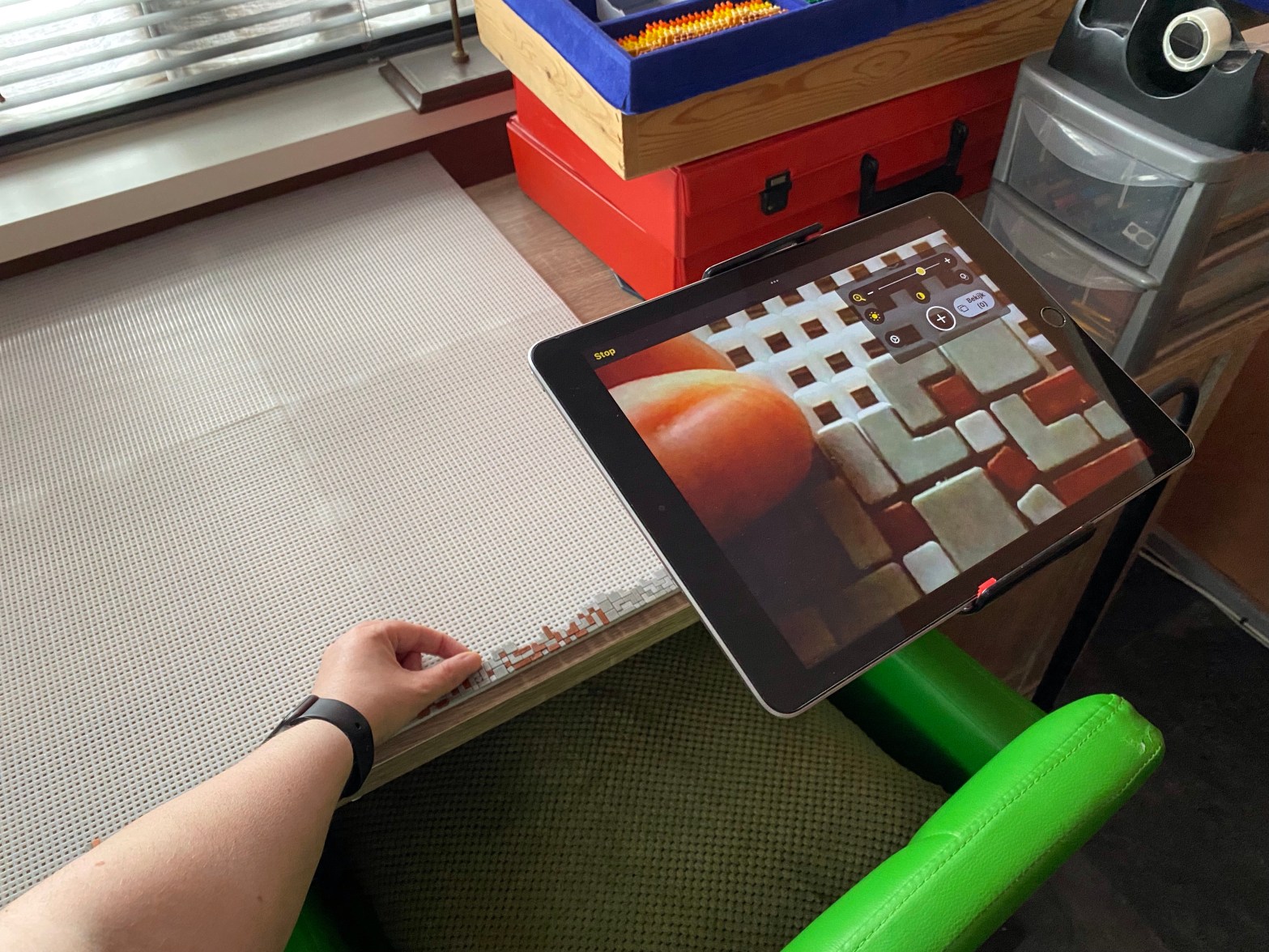
Photo Description: An iPad mounted on a tripod, being used to magnify a ministeck project.
I could tell you about how I wen to the animal park with Jessica last Saturday. How we drank lemonade and ate tasty treats. How we visited with the animals. Said hello to the chickens, saw tiny baby nandus, looked at the rabbits and gunea pigs and checked on the sheep, goats and alpaccas. I love the animal park. It’s a great place to hang out for a little while. Relaxing.
I’d also like to tell you about how I do other things. I often get asked ‘How do you do that’? ‘That’ being everything from going to the toilet, to doing a hobby. I guess it can be difficult to put yourself in the shoes of someone with my disabilities and exercising one’s curiousity when one is hidden behind a phone or computer screen, is easier than it is face to face. Suddenly ‘How do you poop if you’re sitting in a wheelchair’ becomes a totally normal and acceptable question. I disagree though. I have no plans to talk crap in this blog!
Since I started a new Ministeck project earlier this week, which usually you guys get to follow as I make progress, I figured I’d talk about how I do that. My photography hobby is something you also get to see a lot of, since I share my pics on my socials. So I’ll try to explain how that works too.
First the Ministeck: If you don’t know what that is, it’s a form of pixel art using different colored stones of varying shapes. If you buy a set, it comes with instructions showing you how to create the included picture. Kind of like a puzzle. With help from technology, I have started creating my own puzzles. From photos or logos. The tiny stones have pins on the back. You place these pins into holes on a base plate in the corrrect order to create a picture.
The nice part about the pins on the tiny stones is that they feel a bit like braille dots. For anyone who reads braille, there’s letter A stones (1 pixel), B stones (2 pixels), L stones (3 pixels), G stones (4 pixels in a square shape) and J stones (3 pixels in the shape of a right angle). Because I can read braille, I can put my fingers into a box of stones and feel the pins to pick out the stone I’m looking for. I just have to sort the stones into colors. I tend to sort the 1 pixel stones separately from the rest. They’re so tiny it would be hard for even my braille fingers to find them in a box full of different shapes.
I tend to use my fingers to also feel where I need to place a stone onto the base plate. Though when you work on projects as big as my current one, with hundreds of stones and multiple colors, my fingers can’t do it all by themselves. It also helps if I use the remaining eyesight I have but I don’t want to strain my eyes and give myself a headache. That’s where technology comes in.
Did you know an iPad makes a fantastic magnifying glass? No. Not just by opening the camera app. Apple has created an app that acts as a digital magnifying glass. It does use the camera but the app allows you to zoom much more than the camera app does. Not pretty for making photos, but perfect for doing something small like Ministeck.
For christmas 2021 I got a flexible iPad mount that clipped to my desk. It allowed me to move the iPad in any angle I wanted. Meaning I could tip it horizontally and use it as a magnifying glass. I say ‘allowed’, because it broke about about 2 months after I got it. Then one day while shopping in Aldi I saw the same flexible arm, this time mounted into a tripod that could stand on the floor. Making it more versitile as I could move it wherever I wanted in the house. Hoping it wouldn’t be so easily breakable as the desktop version, I purchased it. Right now I’m typing this blog while the iPad is hanging in the mount at face height. Making the perfect computer screen. Though I can still have it hang horizontally and use it as a magnifying glass. So I can place it next to my hobby desk and use it to see more of what I’m doing when building a Ministeck picture. That my friends is how I do it. I achieve the same result as you would. Only I use my fingers and some technology in order to achieve it.
Photography has become a little more challenging over the years as I’ve lost more eyesight. I’ve never been able to look though a view finder, it’s too small and my wobbly eyes refuse to co operate with it. So I have to use a digital camera with an LCD display. Losing more eyesight means I now see less of what’s on the screen compared to what I could see five or so years ago, so I have to do a lot from memory.
I don’t use a DSLR. Though I’d like to try, they’re expensive and I think I may struggle with changing the lenses. I have more of a bridge camera that functions just like a DSLR, without the mirror and the interchangeable lenses. To use it I have to know it like I know my own house. Remembering exactly how many times I need to push each button to change each setting. I can’t see the menus, so I have to remember their layout and order.
On nature walks, I need someone to point out where there might be some nice flowers or some water. Trees I can see though. They’re big, you can’t miss those unless you’re totally blind. I like the challenge of nature photography but for obvious reasons I’m better at shooting less unpredictable subjects. Clouds are fun, they make great artsy pics. I love going to flower gardens and making pics of all the bright colors. Dogs are probably one of my most favorite subjects. They can be unpredictable, but usually with their favorite toy or some food, I can create some great shots. I will also make pics of people if I have to, but I’m not good at it. I prefer to leave that to the professionals. I’m certainly not one of those!
One of the biggest challenges in photography when you only have 5% vision, which also happens to be very blurry, is getting a photo in focus. So I tend to make multiple pictures of the same thing and will often ask Jessica to go through them and throw out the blurry ones. Due to this challenge, and the ammount of energy it costs to use a camera with a screen I can’t really see, I tend to use my phone these days more than I use my camera. Phone cameras have become really good over the last few years and I honestly think if I put a pic from my phone next to a pic from my camera, you wouldn’t be able to guess which is which. Or maybe… if you’re a hardcore professional but most people wouldn’t.
The advantage of using my phone is that the screen is bigger and enables me to see more colors. I need to see colors to get my subject in frame. The rest is based upon luck. Turning on my screenreader VoiceOver while using my phone’s camera can in most cases give me an advantage. It can often give me an audio description of what the camera sees. Helping to get my subject in frame.
The last part of creating a photo is editing. Though photo editing apps are not super accessible if you’re visually impaired. So again, I have to remember where all the buttons are and how many times I need to push or slide them to get the desired effect. You might have noticed I have a specific style when I post my photos. They’re very highly contrasted and saturated. Why? Well, I want to give you an insight into the things I enjoy with my eyes and I can only enjoy those things if they’re bright with a lot of contrast. What you see in my photos is a fraction of what I see though my eyes. Ony a fraction though. If I made them a perfect match, they’d all be blurry and wonky.
It’s a complicated hobby that costs a lot of energy, so I don’t do it as often as I would like. I do enjoy it though. That’s the most important thing.
Thanks for taking the time to read. I hope it wasn’t too crappy for you. See you next week.
 CRS Life